

What Is Find the Different Word?
Find the Different Word is a fast visual observation game. A grid is filled with the same word repeated hundreds of times - but exactly one cell contains a slightly different spelling. Your job is to spot that single odd word before your eyes gloss over the repetition.
The challenge is deliberately subtle: the odd word usually shares the same length and the same opening letters, with only one or two characters swapped. The longer you stare at a uniform wall of text, the harder it becomes to tell one word from another.
Game Modes
Before every round you pick a mode and a grid size. Both are chosen in the start screen shown below.
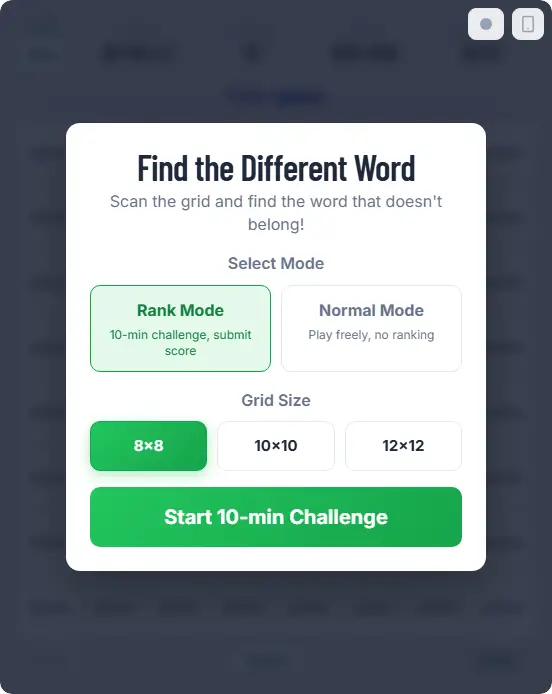
The start screen: pick Rank Mode or Normal Mode, then choose a grid size.
Rank Mode
- A 10-minute timed challenge. The clock starts the moment you press Start.
- Every puzzle you solve adds one to your Solved count, and a new random puzzle appears immediately.
- You have 3 mistakes per puzzle. Running out does not end the challenge - the odd word is briefly revealed and you move on to the next puzzle.
- When the 10 minutes are up, a results screen shows your Solved count and lets you submit it to the leaderboard.
Normal Mode
- Untimed play for practice. Nothing is submitted to any leaderboard.
- You work through the puzzles one at a time, and each solved puzzle pops a short summary before the next one begins.
- Three mistakes on a single puzzle ends that puzzle - use Try Again or Restart as you like.
Grid Sizes
Both modes let you choose the grid size, which sets the difficulty:
- 8x8 - 64 cells. The gentlest option: your eyes scan a smaller area, so the odd word surfaces quickly. Best for warming up or for younger players.
- 10x10 - 100 cells. The balanced default. Noticeably more repetition to sift through without becoming exhausting.
- 12x12 - 144 cells. The hardest option. A large uniform field where your attention has to cover far more ground per puzzle.
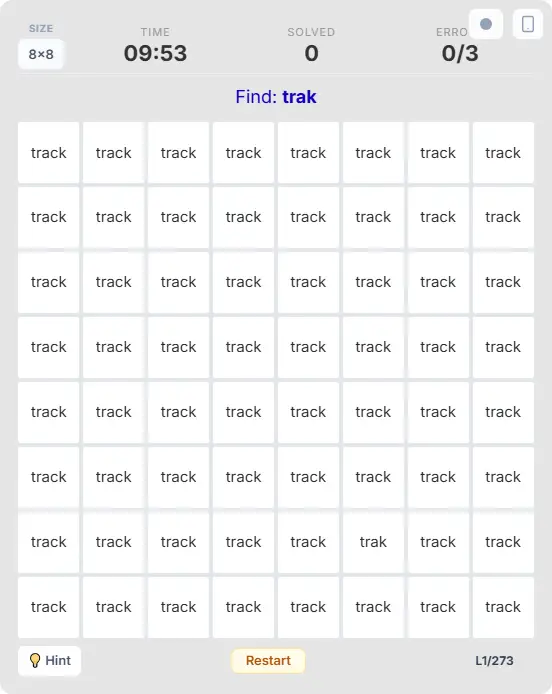
An 8x8 grid in Rank Mode: 64 cells, 9:53 left on the clock, and one cell reading trak instead of track.
Every puzzle word is five letters or shorter, so cells stay readable and the difficulty comes from scanning, not from squinting at long words.
Scoring Rules
- Normal Mode score: each solved puzzle awards points based on how cleanly you found it - a puzzle solved with no mistakes is worth the most, and the reward drops with each mistake along the way, with a minimum floor so a solve is never worth zero.
- Rank Mode score: your leaderboard value is simply the number of puzzles solved inside the 10-minute window. Each solved puzzle counts as exactly one, regardless of grid size.
- Mistakes: a wrong click counts toward the 3-mistake limit of the current puzzle. Mistakes never subtract from your Solved count in Rank Mode.
- Hints: the Hint button briefly highlights the odd word. It does not cost points, but after use it goes on a 120-second cooldown - clicking early only shows a reminder that it is not ready yet.
- No penalties for retrying: you can restart any time; only scores you explicitly submit are recorded.
Ranking Rules
- Leaderboards are kept per grid size (8x8, 10x10 and 12x12 each have their own board), so you only compete against players on the same setting.
- Ranking metric: puzzles solved within the 10-minute window. Higher is better.
- One submission per session: when time runs out you may submit your score once.
- Personal best only: the system keeps your best result per grid size. A weaker run never overwrites a stronger one - you are simply told your existing best.
- Login required to submit: the game is free to play without an account, but leaderboard entries need a signed-in user, so the login panel appears at submission time if you are not signed in.
- Fair play: scores are tied to your account, and manipulated values are rejected server-side.
To climb a board, prioritise consistency over speed: on larger grids a steady scan finds the odd word faster than frantic clicking, because each mistake costs part of a puzzle's three chances.
How to Play - Step by Step
- Choose a mode. Rank Mode for the 10-minute leaderboard challenge, Normal Mode for relaxed practice.
- Choose a grid size. Start with 8x8 if you are new; move up once you can spot the odd word in a few seconds.
- Read the target word. The prompt above the grid tells you which spelling you are hunting for.
- Scan systematically. Read left to right, row by row, rather than letting your eyes wander - random scanning is what makes uniform text blur together.
- Click the odd cell. A correct click advances you to the next puzzle; a wrong click counts as a mistake.
- Use the hint sparingly. It highlights the answer for a moment, then locks for 120 seconds.
Tips for Spotting the Odd Word Faster
- Compare letter shapes, not whole words. Look for a letter that breaks the rhythm - an a where every other cell has an e, or an unexpected doubled letter.
- Focus on one letter position at a time. Scan the third letter of every word in a row, then move to the next row. Position-by-position scanning beats word-by-word reading.
- Blur your eyes slightly. Defocusing helps the irregularity pop out instead of being smoothed over by reading.
- Work in quadrants. Split a 12x12 grid into four 6x6 blocks and clear them one at a time so you never lose track of where you have already looked.
- Avoid re-reading. Once you have scanned a row, move on - repeated passes feel productive but rarely reveal anything new.
Why Play It
- Visual acuity: trains your eyes to detect subtle spelling differences at a glance.
- Sustained attention: the uniform grid punishes wandering focus, so it doubles as concentration practice.
- Scanning speed: repeated play measurably shortens how long it takes to clear a grid.
- Everyday reading: proofreading and skimming both depend on the same skill of catching a single wrong character in a wall of text.
Find the Different Word FAQ
- Is it free? Yes - free to play in your browser, no download required, and no account needed to play. An account is only required to submit a leaderboard score.
- What is the difference between the two modes? Rank Mode is a 10-minute timed challenge whose result goes to a leaderboard; Normal Mode is untimed practice that never submits anything.
- How long is a Rank session? 10 minutes per session, counted down in the stats bar at the top of the game.
- Can I pick the difficulty? Yes - the grid size (8x8, 10x10 or 12x12) is your difficulty setting, and each size has its own leaderboard.
- How many mistakes am I allowed? Three per puzzle. In Rank Mode running out reveals the answer and moves you on rather than ending the session.
- How often can I use the hint? Once every 120 seconds. The button shows no countdown; if you click too early you simply get a reminder.
- Do hints lower my score? No - hints are free, but the cooldown keeps them from trivialising the game.
- Are the words always short? Yes, every word is five letters or fewer so the grid stays readable at all three sizes.